MADE FOR THE MOMENT THEY STEP UP
Their song.
Their moment.
Players and parents choose the music.
You bring Game Day to life.
Personalized announcements. A lineup that stays up to date. A little more magic at the ballpark.
Game Day on iPhone. Apple Music subscription required for the DJ.
Players
choose songs in their browser. No app installation needed.
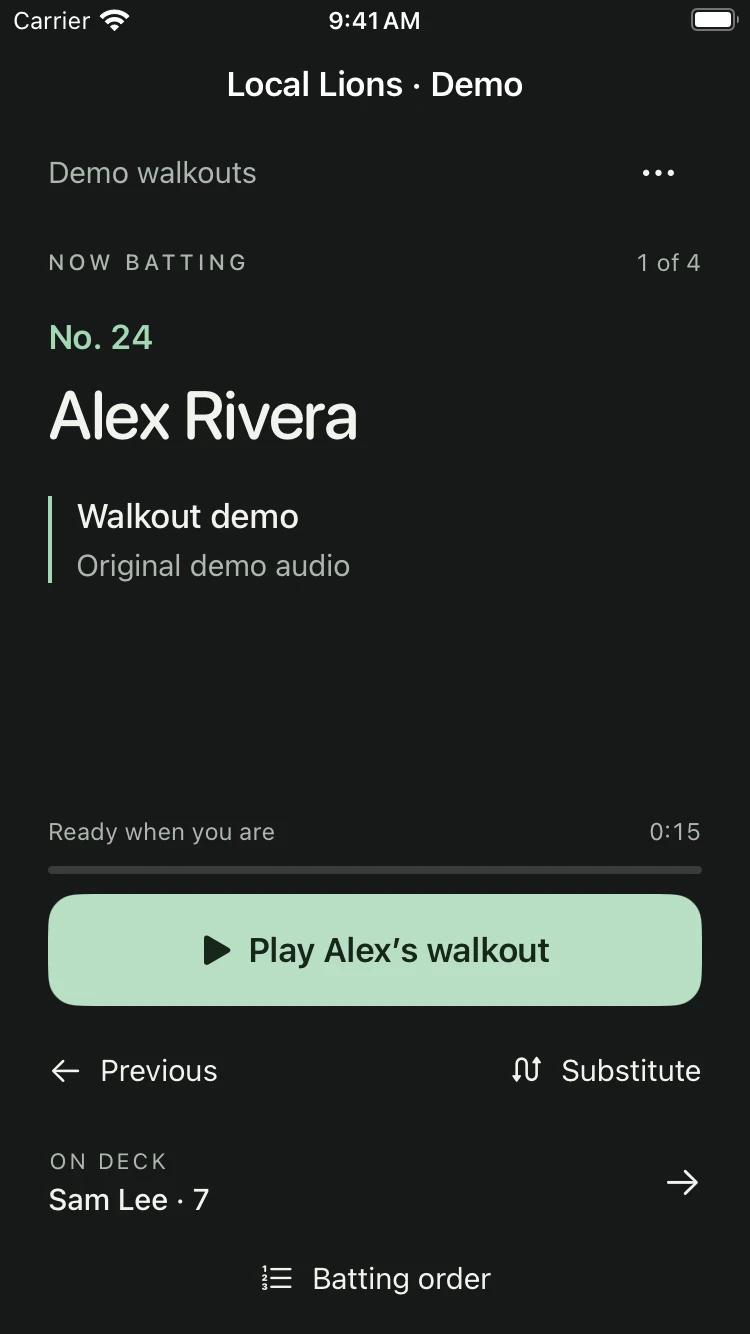
The real Game Day app · Demo team shown
A LITTLE OWNERSHIP. A BIG DIFFERENCE.
They choose it.
You’re ready for it.
Give players a say in their entrance, without another song request to keep track of. Their next choice finds its way to your lineup.
 WALKOUT IQ LOCAL LIONS
YOUR NEXT WALKOUT
Make it yours, Alex.
The part that feels like you. Ready for your next entrance.
One save. Your DJ takes it from here.
UP NEXT
Alex Rivera
Ready when you are
Try the demo. See what happens when Alex saves a new song.
Illustrated flow · Example songs · No audio
-
01
Invite your players.
Parents and players open your invitation in their browser.
-
02
Let them find their moment.
They choose a song and the part they want to walk out to.
-
03
Bring it to the ballpark.
Approved changes are ready for the next playback. A walkout already playing gets to finish.
Prefer a quick review first? Turn on song approvals in your team’s preferences.
LESS TO MANAGE. MORE TO ENJOY.
Be there
for the moment.
The next player. Their song. One clear play button. Game Day keeps the important things close, so you can keep your eyes on the field.
-
Keep the order moving.
The next batter cues automatically. Go back or make a substitution when the game changes.
-
Give every entrance a voice.
Personalized player, pitcher and team introductions. Or let the music do the talking.
-
Your team. Your preferences.
Choose whether songs need approval, explicit selections are allowed, or teammates can share the same song.
Everyone gets
their moment.
Illustration with demo players and songs
SAME TEAM. A WHOLE NEW FEELING.
A soundtrack
for every occasion.
Keep your everyday walkouts. Make room for something special. Create team playlists for holidays, tournaments, or just because.
Create your own occasions. Walkout IQ playlists organize your team’s selections; Apple Music handles song playback.
WHY WALKOUT IQ
A player’s entrance should feel personal.
Making it happen should feel simple.
That’s the idea behind Walkout IQ—and the standard we’re building toward with every team in the beta.
Daniel Algattas · Creator, Walkout IQ
Who needs the app?
The person running Game Day uses Walkout IQ on an iPhone. Invited players and parents choose and update songs in their phone’s browser. They don’t need to install the app.
Do we need Apple Music?
The DJ needs an active Apple Music subscription and must allow Walkout IQ to access Music on their iPhone. Players and parents can choose songs without a subscription. Apple Music is a separate service; it isn’t included with Walkout IQ.
Can players hear their entire song?
The browser offers Apple’s short sample when available. It may not include the walkout interval they choose. An “Open in Apple Music” link helps them find the exact version and listen there; full listening may require a subscription.
What happens when a player changes their song?
When automatic updates are enabled, a saved selection updates the connected DJ’s lineup for the player’s next playback. It won’t interrupt a walkout already playing. Teams can require administrator approval first and set preferences for explicit songs and shared selections.
What if reception at the field is poor?
Prepare Game Day before you leave and download the exact songs in Apple Music yourself. Walkout IQ provides song links to help you find them. It does not automatically download Apple Music songs, and preparation is not a guarantee of offline playback. Test your phone and speaker before the game. A newly changed song may need a connection before it can play.
How do I come back to my team?
Use Log in at the top of this page. Your account brings you back to the teams and player profiles you can manage. You don’t need to find an old invitation or reset email.
Can my team join now? What does it cost?
We’re welcoming U.S. baseball and softball teams in a limited beta. An adult team organizer can request access below. We’ll explain availability, app installation and any applicable costs before you join. Requesting access doesn’t create an account, start a subscription or charge you. Public plans and pricing will be announced when ready.
U.S. TEAM BETA
Let’s make
an entrance.
Bring a little more personality to your ballpark.
Request a
place for your team in the Walkout IQ beta.
Already part of a team? Log in
You’re on the list.
We’ll email you when we’re ready to welcome your team.
Your request is saved. This doesn’t create an account or start a subscription.
Already have an account? Log in